
Run LinkedIn GTM
from Claude.Load a Loadout.
Operate LinkedIn.
Apex turns your AI Agent into a LinkedIn Operator. Agent writes are paced, capped, approval-queued where needed, and logged. Equip your agent with Apex now.create → capture → convert. Your agent runs Loadouts over MCP; agent writes are paced, capped, approval-queued where needed, and logged. The agent gets hands. You keep the keys.
Workflows do steps. Loadouts do jobs.Workflows do steps. Loadouts do jobs.
Pacing shaped by real LinkedIn activity at scale
Every Apex cap comes from LeadShark's own LinkedIn infrastructure — not guesswork, not blog posts. Your agent inherits pacing and safety budgets shaped by real LinkedIn activity at scale, so it stays inside what actually works.Every cap comes from LeadShark's own LinkedIn infrastructure — not guesswork. You inherit pacing and safety budgets shaped by real LinkedIn activity at scale, so you stay inside what actually works.
2.8M+
2.5M+
2.5M+
1M+
24K+
That's what this infrastructure provides: limits shaped by real LinkedIn activity across comments, replies, DMs, and connections — so your agent stays inside what actually works.That's what this layer provides: limits shaped by real LinkedIn activity across comments, replies, DMs, and connections — stay inside what actually works.
Create demand. Capture it. Convert attention into pipeline.create → capture → convert — every Loadout passes through you
Workflows do steps — Loadouts do jobs. MCP gives your agent tools; a Loadout tells it how to win a real outcome. Autonomous about finding and drafting; agent outreach waits in your approval queue. Dashboard automations you arm still run under your daily caps.Workflows do steps. Loadouts do jobs. Tools from MCP; the Loadout says how to win. Autonomous at find/draft; agent sends wait in the approval queue. Dashboard automations you arm run under your caps.
Watch it, then do it. Pick your app.
Five steps end-to-end (~5 minutes). Each client walkthrough video is ~30 seconds — real screenshots, no code. Paste the operator URL after you unlock Apex or the 24-hour trial.
https://apex.leadshark.io/mcpTry the MCP handshake firstTry the handshake first
No account neededPaste this URL into Claude, ChatGPT, or Cursor as a custom MCP server. It connects instantly — no LeadShark sign-in — and gives your agent three info tools about Apex, the setup steps, and the first plays.Paste this URL into the host as a custom MCP server. Instant connect, no sign-in — three info tools: about Apex, setup steps, first plays.
https://www.apex.new/mcpClaude: Customize → Connectors → Add custom connector · ChatGPT: Settings → Apps → Connectors · Cursor: Settings → MCP
Discovery stub only. The full 40-tool operator loadout at apex.leadshark.io/mcp needs Apex or an active Apex trial. Operator URL: https://apex.leadshark.io/mcp.Discovery stub. Full 40-tool loadout needs Apex / active trial: https://apex.leadshark.io/mcp
Equip your agentEquip your agent
Five steps. Five minutes. Easy setup — you build it, you own it.Five steps. Five minutes. Easy setup — you build it, you run it.
Create your LeadShark accountProvision a LeadShark account
7-day trialStart a free 7-day trial — no card required.Start a free 7-day trial — no card required.
Start free trialApex lives inside LeadShark, so the first move is a LeadShark account.You run inside LeadShark, so the first move is a LeadShark account.
Sign up and you land on a full 7-day trial of the platform. No credit card, no friction.Sign up and you land on a full 7-day trial of the platform. No credit card, no friction.
Connect your LinkedInAttach a LinkedIn account
Link the LinkedIn account your agent will operate.Link the LinkedIn account you'll operate.
In Settings → Integrations, connect the LinkedIn account you want your agent to run.In Settings → Integrations, connect the LinkedIn account you'll run.
This is the account Apex will see and act on — comments, reactions, connections, and DMs all happen here, within your limits.This is the account you see and act on — comments, reactions, connections, and DMs all happen here, within the limits set for you.
Connect LinkedIn in Settings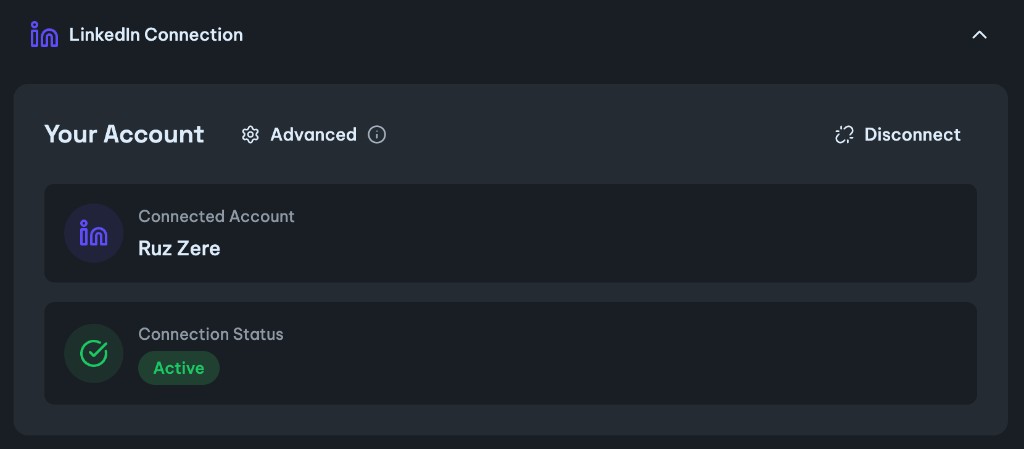
Open your 72-hour Apex operator windowOpen the 72-hour Apex operator window
72h free · no card neededSettings → Apex Settings → Start my 72h trial.Settings → Apex Settings → Start my 72h trial.
Open Settings and find the Apex Settings panel. Click “Learn more & start trial”, then “Start my 72h trial”, to switch Apex on for 72 hours.In Settings → Apex Settings, click “Learn more & start trial”, then “Start my 72h trial”.
It’s a one-time unlock you can trigger whenever you’re ready. It works on the free trial, Pro, and Pro+. After that, Apex is $119/mo. Start when you have an hour to run it properly.It’s a one-time unlock, available on the free trial, Pro, and Pro+. Start when you have an hour to run it properly.
Unlock Apex trial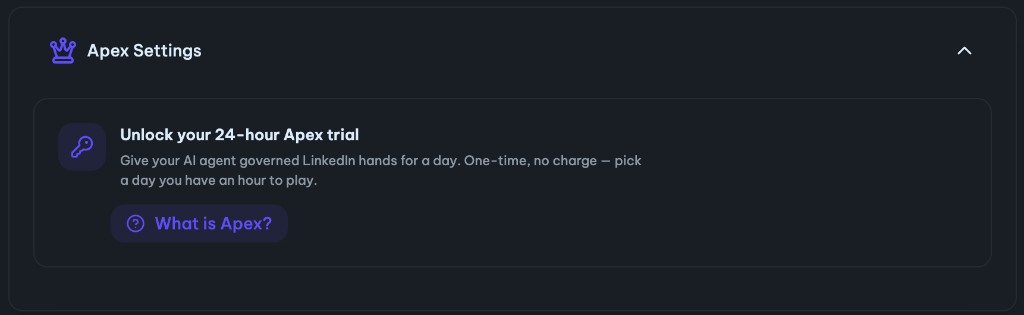
Connect your AI agentMount the MCP server
MCPAdd the Apex MCP server to Claude, ChatGPT, or Cursor.Add the Apex MCP server to Claude, ChatGPT, or Cursor.
Add Apex as a custom connector / MCP server in your AI app, sign in with LeadShark, and approve access. The full operator loadout requires Apex or an active Apex trial (step 3).Add Apex as a custom connector / MCP server in the host app, sign in with LeadShark, and approve access. Full operator loadout needs Apex or an active Apex trial (step 3).
That’s the handshake — your agent now has governed LinkedIn hands. Use the walkthrough below for Claude (recommended) or ChatGPT, step by step with screenshots.That’s the handshake — you now hold governed LinkedIn hands. Use the walkthrough below for Claude (recommended) or ChatGPT, step by step with screenshots.
Want to test the handshake first? Mount apex.new/mcp — a no-account discovery endpoint that connects instantly and tells your agent what Apex is and how to get the real thing.Want to test the handshake first? Mount apex.new/mcp — a no-account discovery endpoint that connects instantly and reports what Apex is and how to get the real thing.
Try first — discovery (no account)No accounthttps://www.apex.new/mcpInstant handshake + info tools. Paste this if you want to verify MCP works before signing up.
Full loadout — authenticatedhttps://apex.leadshark.io/mcpNeeds Apex ($119/mo) or an active 72-hour Apex trial. On free trial, Pro, or Pro+? Unlock the free window in Settings → Apex Settings first. Pro+ alone = automation-layer MCP, not the full operator loadout.
The real 46-tool operator server — Apex or active Apex trial.
Run your first LoadoutRun your first Loadout
Verify it's connected, then run your first Loadout.Verify the link, then run your first Loadout.
Browse LoadoutsUnlock Apex trialStart by verifying — ask “Check if you can see LeadShark Apex and list the tools available.” That’s the moment it clicks: your AI now has a real LinkedIn operating layer.Start by verifying — run “Check if you can see LeadShark Apex and list the tools available.” That confirms the link: you now hold a real LinkedIn operating layer.
Then copy a starter from Your first plays below, or browse the full Loadout library. Agent writes are paced, capped, approval-queued where needed, and logged.Then copy a starter from Your first plays below, or browse the full Loadout library. Agent writes are paced, capped, approval-queued where needed, and logged.
Your first playsYour first plays
Don't start with a campaign. Start with intelligence: see what's working, understand who's worth your time, and show up where attention already is. Run these in order — each is one sentence you type to your assistant.Don't open with a campaign — open with intelligence. Perceive what's working, resolve who's worth your time, and surface where attention already is. Run these in order — each line is a single call you execute.
Tap a play's number to check it off once you've run it.// tap a play's number to mark it executed
Connect + verify
VerifyStart hereThe trust handshake. You see your AI now has a real LinkedIn operating layer — the signals you can’t normally operationalize, now in chat. Not “create a campaign” yet; first, feel the hands.The trust handshake. You confirm you hold a real LinkedIn operating layer — signals that normally can’t be operationalized, now callable. Not “create a campaign” yet; first, feel the hands.
Create — draft the post that pulls buyers
CreateThe Create Loadout. Demand creation grounded in what’s working right now and how you already sound — a post with a capture system attached, not words in a vacuum. You still arm the automation; it then runs under your daily limits.The Create Loadout. Demand creation grounded in live market data and your own voice — a post with a capture system attached. You arm the automation; it runs under your caps.
Capture — signals into approved pipeline
CaptureThe Capture Loadout. A repeatable LinkedIn signal becomes a daily rhythm: find, filter, enrich, draft — then it stops and asks you. Agent outreach waits in the approval queue; everything sent is logged and deduped.The Capture Loadout. A saved signal becomes a daily routine: find, filter, enrich, draft — then it halts for approval. Agent sends wait in queue; every send is logged and deduped.
Convert — turn attention into pipeline
ConvertThe Convert Loadout. A profile says who they are; recent activity says what they care about. Engage in the rooms they’re already in, so follow-up lands warm and moves toward pipeline.The Convert Loadout. Profiles say who they are; activity says what they attend to. Engage in the rooms they’re already in — familiarity before the ask, pipeline after it.
The full playbook
LeadShark Pro
Automate your lead magnet. Schedule posts and auto-DM everyone who comments your keyword.Automate the lead magnet. Schedule posts and auto-DM everyone who comments the keyword.
LeadShark Pro+
Scale automations + MCP automation layer. More running automations, scheduling, and owned-inbound tools — not the full operator loadout.Scale + automation MCP. Headroom and owned-inbound tools — not the full operator loadout.
LeadShark Apex
Discover demand, understand prospects, and act where attention already is. The full operator MCP ($119/mo) — decide what to automate and where to show up.Discover demand, read prospects, and act where attention already is. Full operator MCP at $119/mo.
Grab an app icon for your connectorGive your connector a face
When you add LeadShark Apex in Claude or ChatGPT, give it a face. Click any icon to copy it, or download the PNG. All 256×256, a few KB each.When you add LeadShark Apex in Claude or ChatGPT, the connector needs an icon. Click any to copy it, or download the PNG. All 256×256, a few KB each.
Questions, answeredQuestions, resolved
Everything you need to know before you assemble your agent.Everything you need to know before you connect.
What exactly is Apex?What am I operating?
Apex is the agent layer on top of LeadShark. It connects your AI app — Claude, ChatGPT, or Cursor — to LeadShark over MCP, so your agent can operate a real LinkedIn account in plain English: find buyers, rank intent, comment, connect, and message.Apex is the agent layer on top of LeadShark. It connects the host app — Claude, ChatGPT, or Cursor — to LeadShark over MCP, so you can operate a real LinkedIn account in plain English: find buyers, rank intent, comment, connect, and message.
Do I need to know how to code?Do I need to code?
No. Setup is five steps in about five minutes — create a LeadShark account, connect LinkedIn, unlock the Apex trial, add the MCP server to your AI app, and start asking. (Each client walkthrough video is ~30 seconds.) After that you just type what you want in plain English.No. Setup is five steps in about five minutes — create a LeadShark account, connect LinkedIn, unlock the Apex trial, mount the MCP server, and start asking. After that, just say what you want in plain English.
Which AI apps does Apex work with?Which hosts can I run in?
Any app that supports MCP (Model Context Protocol). Today we document a one-click-style flow for Claude (custom connector), ChatGPT (Settings → Apps → Connectors), and Cursor (Settings → MCP → Add server).Any host that supports MCP (Model Context Protocol). Today there's a documented flow for Claude (custom connector), ChatGPT (Apps → Connectors), and Cursor (Settings → MCP).
Is this safe for my LinkedIn account?Is this safe for the account?
Safety is the whole point. Agent actions share the same daily and weekly budgets as your LeadShark automations, honor your do-not-engage list, and are paced and rate-limit-aware. Sensitive MCP writes are refused or queued for your approval — and everything is fully logged. Dashboard automations you arm yourself (e.g. keyword → DM) still send under those same caps.Safety is the whole point. Agent actions share the same daily and weekly budgets as your LeadShark automations, honor your do-not-engage list, and are paced and rate-limit-aware. Sensitive MCP writes are refused or queued for approval — and everything is logged. Dashboard automations you arm still send under those caps.
Will Apex post or message people without my permission?Will it act without my say-so?
Agent outreach over MCP is queued for your approval on sensitive writes (comments, connects, DMs, email) — set your host’s tool permissions to Ask confirmation for an extra layer. You also set daily caps. Separately, dashboard automations you deliberately arm (like keyword comment → DM) run under those caps without per-message approval — that’s the product you configured.Sensitive MCP writes queue for approval (and your host Ask setting). Caps always apply. Dashboard automations you arm run under those caps without per-message prompts — by design.
What does it cost?What does it cost?
Apex runs inside LeadShark. New accounts get a free 7-day LeadShark trial, and you can flip on a one-time 72-hour Apex trial whenever you're ready. It works on the free trial, Pro, and Pro+ (the Apex tier is $119/mo).Apex runs inside LeadShark. New accounts get a free 7-day LeadShark trial, and a one-time 72-hour Apex trial can be flipped on anytime. It works on the free trial, Pro, and Pro+ (the Apex tier is $119/mo).
Ready to give your AI agent governed LinkedIn hands?Ready to put your agent on LinkedIn?
Five steps. Five minutes. You build it, you own it — paced, capped, and fully logged.Five steps. Five minutes. You stay in control — paced, capped, and fully logged.